




Many leaders view disaster recovery testing as nothing but another routine IT requirement. That view changes fast when a core database fails at the worst possible moment. 71% of organizations neglect failover testing in their disaster recovery testing process, which leaves them open to massive data losses.
|
“Effective disaster recovery testing means more than restoring files. It proves your entire organization can recover, communicate, and operate under pressure.” – Eric Thibodeaux, Co-Founder of InfoTECH Solutions |
By comparison, effective disaster recovery (DR) testing means validating that recovery plans work under real conditions, with systems, data, and teams responding as expected rather than relying on documentation alone. Just because your DR plan makes sense on paper doesn’t mean that it will perform in a real incident.
The rest of this blog is here to help you with your disaster recovery testing process. We will not cover how to create a disaster recovery plan here. This article is about how you can test your disaster recovery plan once it has already been established.
What is Disaster Recovery Testing?
Disaster recovery testing is the process of checking whether your organization can restore IT systems, data, and operations after a disruptive event such as hardware failure, cyber incidents, or natural disasters.
During the DR testing process, IT teams simulate real-world scenarios to confirm that backup systems, recovery plans, and communication steps work as intended. This process helps identify gaps, such as missing data, slow recovery times, or unclear responsibilities, so they can be corrected before an actual incident occurs.
Furthermore, it’s important to realize that a disaster recovery plan is not the same as a data backup strategy. Backing up your data is just one part of what should be your broader disaster recovery plan. Here is a comparison.
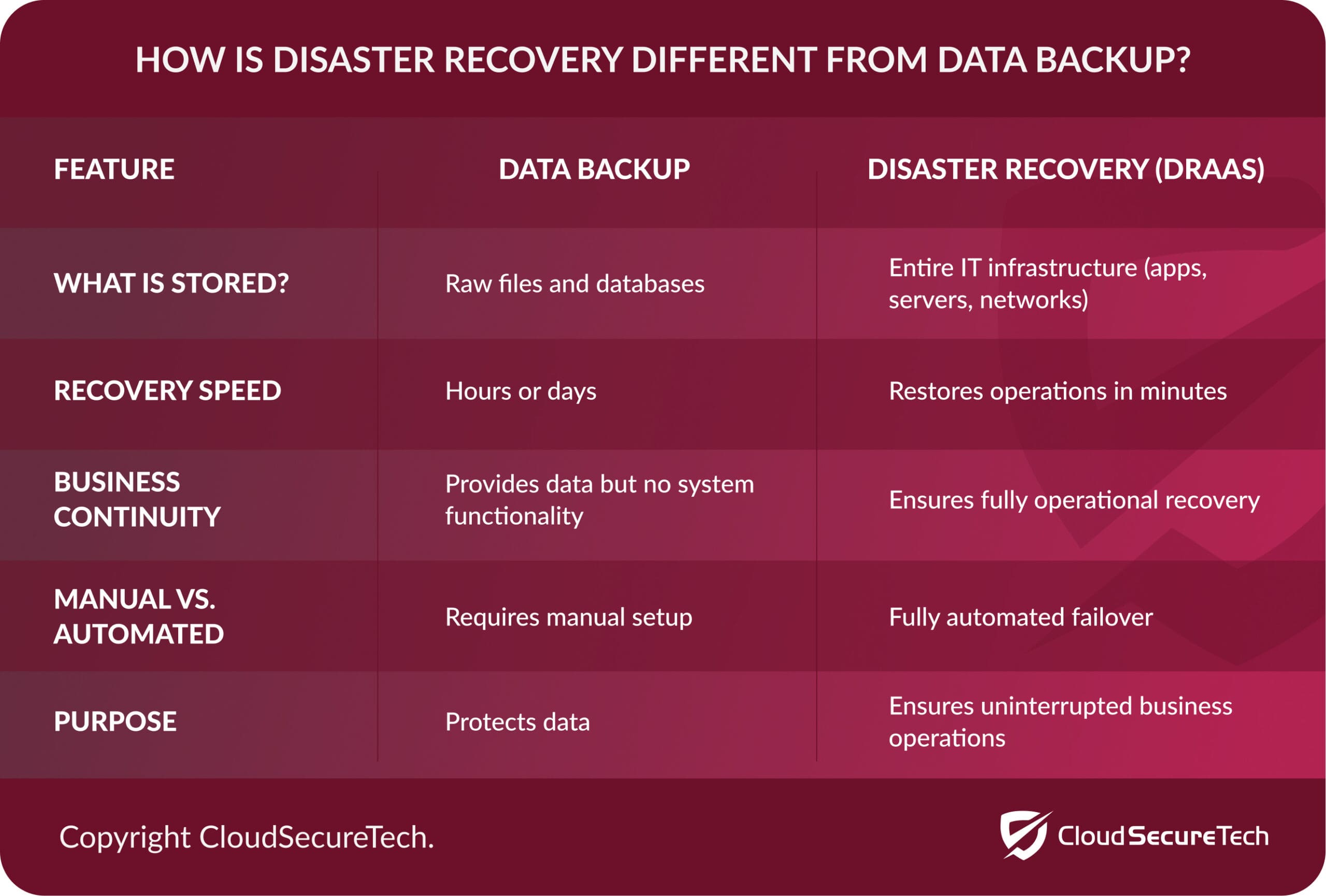 Source: CloudSecureTech
Regular testing supports business continuity by reducing downtime, protecting critical information, and helping staff respond with clear, practiced actions when systems become unavailable. Yet, 83% of organizations have not tested their disaster recovery plan. There are a lot of risks related to skipping this step. Here are just a few of them.
The Risks of Not Testing The Disaster Recovery Plan
False Sense of Preparedness
A plan that has not been tested often appears complete on paper but fails under real conditions. Teams may assume systems will recover as expected, yet hidden gaps in processes, dependencies, or configurations can prevent recovery. This creates a situation where leadership believes operations can resume quickly, while in reality, delays and confusion slow response efforts.
Extended Downtime
Unverified recovery steps can lead to longer outages when systems fail. Teams may spend valuable time identifying missing backups, incorrect configurations, or unclear responsibilities. Each delay increases operational disruption, which affects productivity, revenue, and customer trust.
Data Loss or Corruption
Without testing, backup integrity remains uncertain. Files may not restore properly, or recovery points may be outdated or incomplete. When recovery fails, organizations risk losing critical business data or restoring inaccurate information, which can impact decision-making and compliance requirements.
Feel Confident in Your Data Security With 24/7 Business Continuity
Breakdown in Communication
Disaster recovery relies on clear coordination across teams. If the plan has not been tested, roles and communication paths may be unclear. This can lead to duplicated efforts, missed tasks, or delays in escalation, which will slow down the overall response and increase the impact of the event.
Failure to Meet Compliance Requirements
Many industries require proof that recovery processes work as intended. Without testing, organizations cannot validate recovery time objectives or data retention standards. This can lead to failed audits, regulatory penalties, or loss of certifications that support business operations.
Increased Recovery Costs
Issues discovered during an actual outage are often more expensive to fix than those found during testing. Emergency troubleshooting, extended downtime, and external support costs can rise quickly. Testing helps identify and resolve these issues in a controlled setting, which reduces financial impact.
Inability to Scale During an Incident
A recovery plan that has not been tested may not account for real-world demand during a disruption. Systems may not handle the required load, or recovery processes may not scale across locations or users. This limits the organization’s ability to restore operations fully and efficiently.
Loss of Customer Trust
Customers expect reliable service and quick recovery from disruptions. When recovery efforts fail or take too long, it signals a lack of preparation. This can damage reputation, reduce customer retention, and create long-term challenges in maintaining trust.
The Key Steps of The Disaster Recovery Testing Process
|
Step |
Phase Name |
What Happens in This Step |
Why It Matters |
|
1 |
Define Scope and Objectives |
Identify systems, applications, and data to include. Set clear goals for the test. |
Focus keeps the test aligned with business priorities and avoids wasted effort. |
|
2 |
Inventory Critical Assets |
Document servers, applications, network components, and dependencies. |
You cannot recover what you have not identified. This step prevents gaps. |
|
3 |
Review Recovery Plans |
Examine current disaster recovery documentation and procedures. |
Confirms that plans are up to date and usable before testing begins. |
|
4 |
Assign Roles and Responsibilities |
Define who handles each task during the test. |
Clear ownership reduces confusion and speeds up response time. |
|
5 |
Choose Test Type |
Select a method such as tabletop exercises, simulations, or a full failover test. |
The test type determines risk level, depth, and resource needs. |
|
6 |
Prepare Test Environment |
Set up systems, backups, and tools needed for testing. |
Proper setup prevents disruptions to production systems. |
|
7 |
Execute the Test |
Run the recovery process based on the selected scenario. |
Validates whether systems can recover within expected timeframes. |
|
8 |
Monitor and Record Results |
Track recovery time, errors, and system behavior during the test. |
Data provides insight into performance and weaknesses. |
|
9 |
Identify Gaps and Issues |
Analyze results to find failures, delays, or missing steps. |
Highlights risks that could impact real recovery efforts. |
|
10 |
Update Recovery Plans |
Revise documentation and procedures based on findings. |
Keeps the plan accurate and aligned with current systems. |
|
11 |
Train Teams |
Share results and train staff on updated processes. |
Builds confidence and improves response during actual events. |
|
12 |
Schedule Regular Testing |
Set a cadence for future tests, such as quarterly or annually. |
Ongoing testing keeps recovery capabilities reliable as systems change. |
Common Disaster Recovery Testing Mistakes & How to Avoid Them
Overconfidence in Built-In Recovery Features
Many platforms include native recovery tools, which can lead teams to assume protection is complete without validation. These features may not cover all the workloads, configurations, or dependencies you need covered. For instance, while Microsoft 365 has a powerful DR recovery tool, and 74% of businesses use it, only 15% of these businesses were able to fully recover all of their data after an incident.
This discrepancy isn’t the result of Microsoft’s features; it’s the result of a lack of oversight on how disaster recovery unfolds. No matter what platform you use, be sure to test each recovery function in real scenarios, confirm coverage across systems, and document any gaps that require additional tools or processes.
Infrequent Testing
Some organizations test once a year or only after major changes. This approach leaves long periods where new risks go unverified. So, you should schedule regular testing cycles that align with system updates, infrastructure changes, and business needs. Frequent testing helps identify issues early and keeps recovery processes current.
Ignoring Application & IT System Dependencies
Recovery plans often list systems but fail to map how they rely on each other. During an incident, restoring systems out of order can prevent applications from functioning. That’s why you need to make sure that you document all dependencies and test recovery sequences to confirm systems come back online in the correct order.
Limiting Tests to Basic Scenarios
Basic tests often focus on simple system restoration rather than full operational recovery. This leaves gaps in areas such as application dependencies, user access, and data consistency. For this reason, your team should run scenario-based tests that reflect real incidents, including partial failures, multi-system outages, and access restoration.
Applying The Same Strategy For On-Premises & Cloud Databases
48% of businesses struggle to adapt to cloud-based disaster recovery. This statistic is not surprising. You cannot simply apply the same recovery strategies to cloud-based databases that you used for on-premise servers. Instead, you should design separate recovery strategies that reflect each environment’s architecture, then test them independently and together to confirm full coverage.
Explore More on IT & Security
How to Interpret Your Disaster Recovery Test Results
When reviewing test results, you look at how long recovery actually took and how much data was lost, then compare those numbers to your Recovery Time Objective (RTO) and Recovery Point Objective (RPO) targets. If recovery took longer than expected or data loss exceeded limits, the test shows a gap that needs attention.
RTO is the maximum amount of time systems can be down before the impact becomes unacceptable, while RPO is the maximum amount of data loss your business can tolerate.
Also, focus on what worked and what failed during the test. A strong DR test report documents each step, including system recovery times, errors, delays, and any manual work required to restore services. For example, if an IT system came back online but required extra manual fixes, that signals a reliability issue. If a backup restored correctly but took too long, that points to performance limitations. Use these findings to refine your DR plan for the future.
Make Your Next Disaster Recovery Test Count
You want more than a check-the-box exercise-you want a disaster recovery test plan that proves your business can bounce back fast. Old playbooks don’t cut it when today’s threats are faster, sneakier, and hit where it hurts most. With InfoTECH Solutions, you get a test plan built for the real world: it’s designed, not recycled. You see exactly where your systems hold strong and where you need backup.
A modern disaster recovery test gives you answers, not just hope. It means your team knows their roles cold, your data stays locked down, and your recovery times are measured in minutes, not days. You get a process that grows trust with regulators, partners, and customers. It cuts downtime, drives compliance, and means your business keeps moving-even when disaster strikes.
Ready for a test that actually gives you confidence? Reach out and see how InfoTECH Solutions builds disaster recovery that fits your business, not someone else’s.