




AI is often discussed in terms of how it is making cybersecurity protection more difficult. This concern is not entirely unfounded. 56% of organizations say that they have encountered AI-powered cyber threats, and only 20% of organizations say they feel adequately prepared to face them. The good news is that you can “fight fire with fire” through AI-enhanced cybersecurity.
| “AI may have made it easier for attackers to create convincing phishing campaigns and trick cybersecurity software, but at the same time, AI has also made it easier for you to implement stronger cybersecurity measures that get ahead of these types of attacks.” – Eric Thibodeaux, Co-Founder of InfoTECH Solutions |
However, like all technology, careful implementation is paramount. This statement is even more true when AI is involved. That’s because these tools depend on accurate data and proper configuration. Gaps in the data can lead to incorrect decisions that weaken threat detection, and even small configuration mistakes can reduce performance and limit the system’s ability to identify risks.
To help you make the most of this technology, we will give you an introduction to AI-powered cybersecurity. We will discuss how you can use AI to enhance cybersecurity, what not to do, and how you can effectively implement it while mitigating common challenges.
How Can AI be Used to Enhance Cybersecurity Measures?
Faster Threat Detection
AI tools can analyze large volumes of data in real time. They scan network traffic, user activity, and system logs continuously to spot suspicious behavior or malicious activity as soon as it emerges. That rapid detection lets security teams respond far sooner than they could with traditional, manual methods.
Better Identification of Novel Threats
AI does not rely only on known threat signatures. Instead, it uses behavior-based and anomaly detection methods to recognize deviations from normal patterns, such as unusual access times, odd data transfers, or strange login locations. This ability helps catch zero-day attacks or insider threats that might evade signature-based systems.
Add Another Layer of Security With Experts Monitoring Your Network 24/7
Automated Containment
When AI detects a threat, it can trigger automated actions based on how you set it up. Examples include isolating affected systems, blocking malicious traffic, or disabling compromised accounts. This automation helps limit potential damage while reducing the workload on your security staff.
Simpler Handling of Large & Complex Data
Modern IT environments generate huge volumes of logs, events, user activities, and network flows. Humans cannot process all that data quickly or reliably. AI scales easily. It analyzes vast datasets in parallel, monitors across cloud, on-premises, and hybrid systems, and maintains constant vigilance.
Adaptive Protection
AI systems improve over time. As they see more data, they adapt their models to better detect suspicious activity. This ongoing learning helps keep defenses up to date even as attackers evolve tactics.
What is Not a Way AI Enhances Cybersecurity?
Often, understanding what not to do can be just as important as understanding what to do. There are many misconceptions about AI-powered cybersecurity, so here is a quick overview of what many people assume you can use it for vs. what you should not use it for.
| How Not to Use AI | Why Not? | How to Use AI Instead |
| Using AI to replace your human security analysts | AI cannot match human judgment. Relying on it alone leads to missed threats and poor decisions during incidents. | Use AI to filter noise, correlate alerts, and speed investigations while people keep control of risk decisions. |
| Letting AI run incident response without human approval | AI may shut down the wrong system or apply changes that interrupt normal operations. It may also act without considering legal needs or business priorities. | Use AI to suggest actions, enrich cases, and automate low-risk tasks while humans approve major responses. |
| Assuming AI cybersecurity alerts are always correct | AI models can hallucinate, miss threats, or trigger false positives and negatives. Blind trust leads to wasted effort and missed threats. | Treat AI output as input to an analyst, add human review, and validate rules and models with regular testing. |
| Feeding AI tools protected data | AI platforms often save what you type or use it to improve their models. That can place confidential or regulated information at risk. | Use vetted, governed AI platforms with clear data policies and limit what you share with your tool. |
| Expecting AI can catch every new threat tactic | AI is good at pattern-matching, which is why it’s more effective than traditional antivirus software. However, creative, low-and-slow attacks that blend in with normal use are still hard for it to detect. | Combine AI with expert threat hunting, log review, and red-teaming so people can spot what models miss. |
| Using AI as a reason to cut back on basic controls and awareness training | Weak passwords, missing patches, and untrained users still give attackers easy entry that AI may not fully cover. | Maintain good cyber hygiene, identity controls, and awareness programs, then layer AI on top of that to add speed and scale. |
| Assuming that AI cybersecurity tools cannot be compromised themselves | Attackers already target AI security systems for malware, phishing, and evasion. | Treat AI like any other IT system with security reviews, access controls, monitoring, and abuse detection, even if you’re using it to boost cybersecurity. |
How to Implement AI-Enhanced Cybersecurity at Your Organization
1. Assess Your AI Readiness
Review your current security tools, processes, and data sources. Look at where you collect logs and alerts, and note gaps in coverage or skills. This assessment helps you avoid buying AI tools that cannot perform because they lack the right inputs. It also shows where you might reduce manual effort through automation, such as repetitive alert triage or simple containment actions.
2. Define Your Use Case Based on Clear Outcomes
Pick a small group of high-value use cases instead of trying to apply AI across everything. Write down the problem you want to solve, the data you need, and the result you expect. This keeps goals realistic and helps you compare solutions that match your needs.
3. Get Your Data Ready
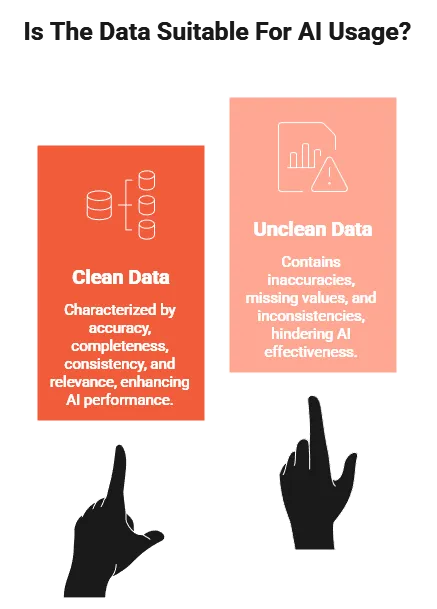
AI works best with clean and consistent data; some estimates even suggest that your data quality can affect AI’s performance by 11.4% per task. Standardize logging across systems and reduce noise to make the information easier to use. Store your data in a central place that your AI tools can access. Good data practices support both your current monitoring and future AI efforts.
4. Research & Select The AI Tools That Fit Best
Evaluate security platforms that include AI or machine learning features for the use cases you defined. During evaluation, test how well the tools integrate with your existing systems, and request proof-of-concept deployments using your real data.
Ask vendors to explain how their models are trained, how they handle false positives, and how their tools present results to analysts. You want tools that improve detection accuracy while keeping alerts understandable and actionable for your team.
5. Integrate AI Into Current Workflows
Feed AI insights into the systems your team already uses so nobody needs to check a separate tool. Make sure your staff understands how to read AI-generated alerts, ratings, and explanations during an investigation.
Connect AI tools to your automation platform to handle routine tasks and send complex issues to your team with the needed context. This lowers manual effort and supports faster response.
6. Train & Upskill Your Team
Give your team training that explains what the AI tools do, what the outputs mean, and where the limits are. Use real examples from your environment to show correct and incorrect results. Ask your staff to track lessons learned so they improve how they use AI tools over time. 68% of incidents involve human error, and AI tools can only do so much to reduce that.
7. Adjust Your AI Systems Over Time
Set clear metrics before you roll out your AI solution. Measure detection accuracy, false positives, and response times. Use these results to see what works and what needs adjustment. Share progress with leaders in clear business terms, and use reviews to decide where to expand or refine your AI use.
| Learn More About How You Can Protect & Optimize Your IT Systems |
Common Challenges With AI-Enhanced Cybersecurity to Proactively Mitigate
Skewed Detection Results
AI tools learn from the data they are given. If that data does not reflect how people in your business actually work, the system can make inaccurate decisions. It may flag your employees for normal activity or miss unsafe behavior from outside threats. You can lower this risk by choosing tools trained on wider datasets, checking for biased results, and updating the model as your business changes.
Data Poisoning
Attackers may try to mislead an AI system by feeding it false information. This can cause the tool to treat unsafe actions as harmless. You should treat your AI models the same way you treat your other important business systems. Protect them, check their inputs, and don’t assume that the technology can defend itself.
Lack of Transparency
Some AI tools make decisions in ways that are hard to understand. This can complicate compliance, slow your team’s response to alerts, or create uncertainty when the system raises questions. Choosing tools that explain how decisions are made, keeping clear documentation, and involving your team in key decisions can help reduce confusion and build trust in the results.
High Resource Demands
AI tools may require more processing power and storage than your organization can handle. This can strain your systems or raise costs. Starting with lighter tools, expanding only as needed, using cloud services, or combining AI with simpler solutions can help you keep expenses under control while still improving security.
Data Privacy Risks
AI tools often collect large amounts of activity data from your employees and systems. This may create privacy concerns for your business. Poor handling of this information can lead to compliance issues and damaged trust. Setting clear data policies, limiting who can access sensitive information, using anonymization where possible, and following relevant regulations help protect your business before you roll out AI-driven security tools.
| Reach Out to Louisiana’s Leading Cybersecurity Consultants! | ||
| New Orleans | Lafayette | Baton Rouge |
Talk to Our Team About Introducing AI-Enhanced Cybersecurity
If you want help putting AI-driven protection in place without overloading your staff or risking misconfiguration, InfoTECH Solutions can help. Our team reviews your current tools, data, and security controls, then supports you with managed protection, continuous monitoring, cloud services, and user training.
Get your AI-powered protection started on the right foot. Talk to us today!